Turn doors faster
Doors turn quicker when every trailer's time at the dock is measured.
- Door status and occupancy
- Trailer dwell and detention
- Load and unload cycle time
- Trailer fill level
- Yard queue and arrivals
Agnify watches your existing camera feeds around the clock and turns them into dock dwell times, shipping records, safety alerts and labor data your team can act on the same shift.
Detention alone cost US trucking $15.1B in 2023, and one stop in ten ran more than two hours past its appointment.1
Per hour of detention, charged after as little as 20 minutes of free time, in Old Dominion's published tariff. XPO's bills $2752
Carrier tariffs, 2025What every 1% of labor time recovered is worth at a 150-associate site, at $40.19 an hour fully loaded3
Arithmetic on BLS pay dataAverage value lost per cargo theft event in 2025, up 36% in a year; 16% of events happen at facilities4
CargoNet and BSI, 2026Injury rate in warehousing and storage against all private industry: 4.8 vs 2.3 cases per 100 workers5
BLS SOII, 2024Put in your own numbers. This is arithmetic on your headcount and pay, not a promise of what Agnify will recover.
against $12.4M of labor a year at this site
The feasibility study measures what your cameras can actually see.
Every one runs on the cameras you have already installed. No tags, beacons or new sensors on the floor.
Doors turn quicker when every trailer's time at the dock is measured.
The manifest writes itself as the trailer loads, by pallet or by carton.
Disputes end with a timestamp and a clip, not a search.
Rules you set, checked on every camera, every shift.
Staffing follows the work, hour by hour.
See the whole floor, not one camera at a time.
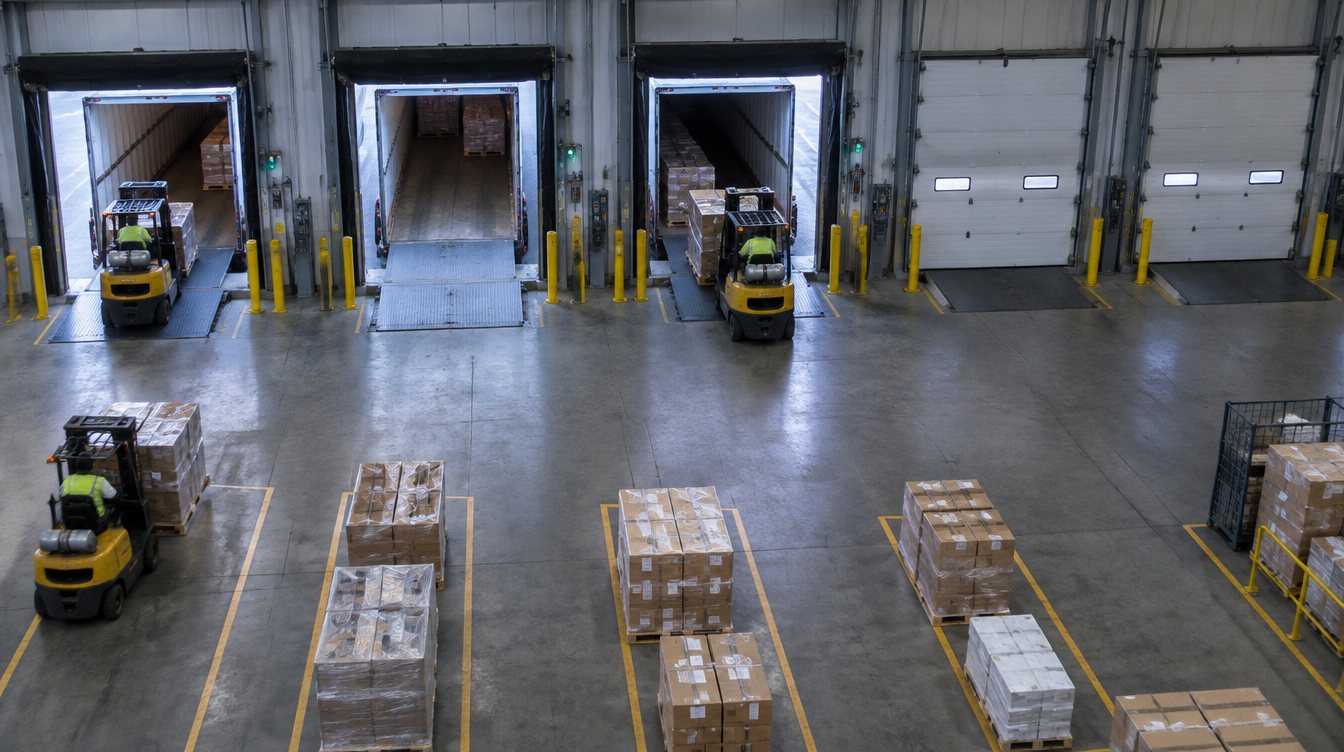
Agnify tracks doors, machines and loads in the same frame and turns them into events your team can filter.
Generated image with example data; every pallet, forklift and door in frame is marked.
Agnify follows each pallet from the staging lane onto the trailer and writes the record as the load happens.
| Pallet | Order | Loaded | Check |
|---|---|---|---|
| 24 | SO-88207 | 22:31 | Matched |
| 25 | SO-88207 | 22:34 | Matched |
| 26 | SO-88213 | 22:36 | Belongs on door 7 |
| 27 | SO-88209 | 22:39 | Matched |
Example data for illustration only.
You set the rule once for a zone, aisle or crossing. Agnify checks it around the clock and sends the clip when it's broken.
Speed measured against the limit you set for each zone, aisle or crossing.
speed > 5 mph in Main laneTravel with the load or empty forks above travel height, and forks left up when parked.
forks > 12 in while movingPallets set down in walkways, fire exits, marked no-storage areas or the wrong staging lane.
pallet in Walkway A > 2 minPeople or forklifts entering areas they aren't allowed in, by zone and by time of day, including high-value cages after hours.
person in Zone C, shift 3Required behaviors skipped: stopping at crossings, setting the dock leveler, a spotter when reversing.
no stop at Crossing 2People inside a set distance of a moving forklift, including in the blind spot behind one that reverses.
person < 3 ft of moving forkliftHi-vis and hard hats where your site rules require them.
no hi-vis in Dock zonePedestrians walking in travel lanes instead of the marked walkway.
person in Lane 4 > 5 sRules shown are examples; thresholds, zones and schedules are set with each site. Agnify gives leading indicators and does not replace barriers, training or forklift controls.
We built a 200 × 130 ft distribution center with 8 dock doors, 4 forklifts, 8 workers and 8 security cameras mounted like a real install, so we can show every scenario without anyone's customer footage. For Agnify on real footage, see the public examples.
Forklifts carry pallets between trailers and staging lanes while doors and levelers open and close.
Door state, trailer dwell, and pallets counted in and out per door
Raw synthetic footage from Agnify's demo warehouse, rendered in Blender; the hero clip is a photoreal pass of the same scene. Every event in the scene is labeled frame by frame, so detection can be scored against ground truth.6
Agnify places every person, forklift and pallet it sees on a map of your building, so you can find things and see how the space is used.
Heat maps build up over a shift, a day or a week: foot traffic, forklift travel and rack and lane occupancy.
The same events feed instant notifications and reports you can compare shift to shift, day on day, week on week or month on month.
Routed by zone, shift and event type to a phone, an inbox, a team channel or your own systems through webhooks. Each one links to its clip.
Scheduled to the inboxes that need them, with the change from the period before.
Example data for illustration only.
No rip and replace. Agnify connects to the feeds you already record.
A small recorder on site reads your IP cameras over RTSP. The site opens every connection, and only outbound HTTPS leaves the building.
Models tuned on your footage track forklifts, people, pallets and doors, then apply your rules: speed limits, zones and dwell thresholds.
Alerts go to the people who can respond, each linked to its clip. Dashboards and scheduled reports show trends, and anyone can ask a question in plain English.
Nothing to host. Results arrive about two minutes after the event, which suits dwell, counts and daily safety reviews.6
A server on site for real-time alerts, limited bandwidth or rules that keep video in the building.
A free feasibility study on your own cameras, with an agreed end date and no commitment.
Usually not. Agnify works with standard IP cameras. The feasibility study checks coverage, angles and resolution on the views you care about and tells you if any camera needs to move.
By default, to Agnify's cloud over outbound HTTPS; nothing inbound is opened in your firewall. Sites that need video to stay on premises can run Agnify on an edge server instead.
No names or faces. People are tracked as anonymous positions to build heat maps, measure zone staffing and balance labor. People can be masked in stored clips, and we agree retention rules with you before anything goes live.
A floor plan and your camera positions. During setup we map each camera's view onto the plan; the more of the floor your cameras see, the more complete the twin.
Yes. Where product moves on a gravity or extendable conveyor, Agnify counts cartons as they pass a line you set, instead of counting pallets at the door. Door state, trailer dwell, fill level and the safety rules work the same way. Counting on a conveyor is one of the use cases Agnify already runs in food and beverage plants.
No. It gives your team leading indicators, such as near misses and speeding, that are hard to collect by hand. Barriers, training and forklift controls still do the protecting.
Events and alerts are available through webhooks and an API. Load plans or orders from your WMS let Agnify confirm products against trailers, and door times, counts and incidents can flow back into the systems and reports you already use.
We measure it on your footage. The feasibility study and the pilot report accuracy against counts and events your team checks by hand, before anything scales.
Name the doors, aisles or crossings you want checked. We'll reply within one business day with next steps for a feasibility study.
Footage on this page is synthetic, rendered by Agnify. Scenes marked Illustration are generated images with example data.